Black specks in plastic extrusion usually come from degraded polymer deposits or foreign particles carried into the melt. Check the particle first, then trace four stages: raw materials and additives, handling, screw and barrel, and the screen pack, die and downstream equipment.
Whether you manufacture modified plastics, pipes, plastic sheets, 3D printing filaments, drinking straws, or blown films, black specks can appear unexpectedly. They increase scrap rates, affect product appearance, and can quickly lead to customer complaints.
But where do these black particles actually come from?
Are they caused by carbonized polymer inside the extruder, contaminated raw materials, worn screw and barrel components, or deposits accumulating in the die?
The key to solving black specks is to identify their type first, then trace their source along the entire material flow path.
This guide explains how to identify different types of black specks, perform a systematic four-step inspection, and apply practical solutions to prevent them from recurring.
1. Identify the Type of Black Specks Before Disassembling the Extruder
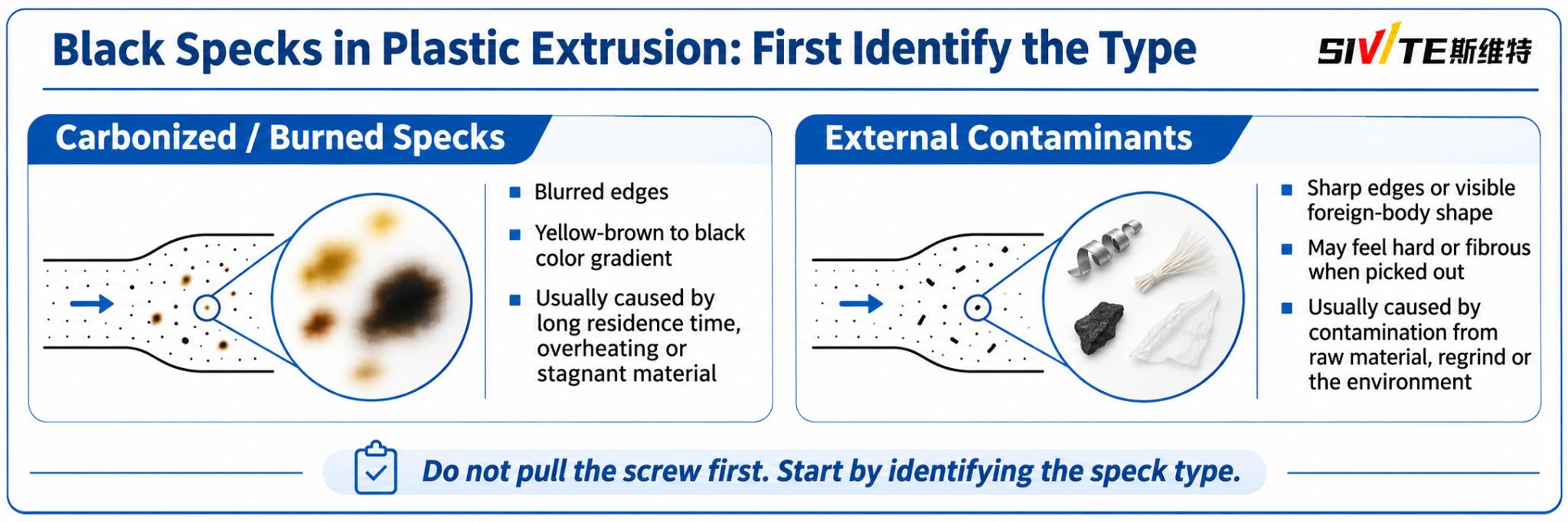
When you find black specks in an extruded plastic product, do not immediately pull out the screw.
The first step is to examine the appearance and physical characteristics of the particles.
There are two common types.
1.1 Carbonized or Burnt Polymer
Carbonized black specks are generally associated with thermal degradation inside the processing equipment.
Typical characteristics include:
- Blurred or irregular edges.
- A color gradient ranging from yellow or brown to dark brown and black.
- Particles that may smear, deform, or break apart depending on their degradation state.
- A tendency to appear repeatedly during production, even after raw materials have been changed.
Common causes:
- Excessively long material residence time.
- Local overheating caused by excessive shear.
- Stagnant polymer trapped in screw or barrel dead zones.
- Material accumulation around vent ports, adapters, or die channels.
- Poor purging during material or color changes.
When polymer remains at high temperatures for too long, thermal degradation and carbonization can occur. The resulting deposits may eventually detach and enter the melt stream.
1.2 External Contaminants
External contaminants enter the processing system from raw materials, additives, the production environment, or equipment components.
Typical characteristics include:
- Relatively sharp edges and clearly defined shapes.
- Visible foreign-body structures, such as fibers, metal fragments, or plastic film.
- Some particles may feel hard or fibrous when examined carefully.
Common sources include:
- Metal fragments.
- Packaging film and bag fibers.
- Dust and foreign particles.
- Contaminated regrind.
- Foreign polymer residues from previous production runs.
A simple visual inspection can provide useful clues, but it cannot always identify the exact material. For difficult cases, use microscopy, magnetic separation, or laboratory material analysis.
Dark inclusions can also resemble gel defects and fish eyes. Important: Do not assume every black speck is carbonized polymer. Treat identification as the first diagnostic step.
2. Trace the Source of Black Specks: A Four-Step Inspection Method
Black specks rarely appear without a reason.
The most effective troubleshooting method is to follow the material flow from the raw material supply system to the final die.
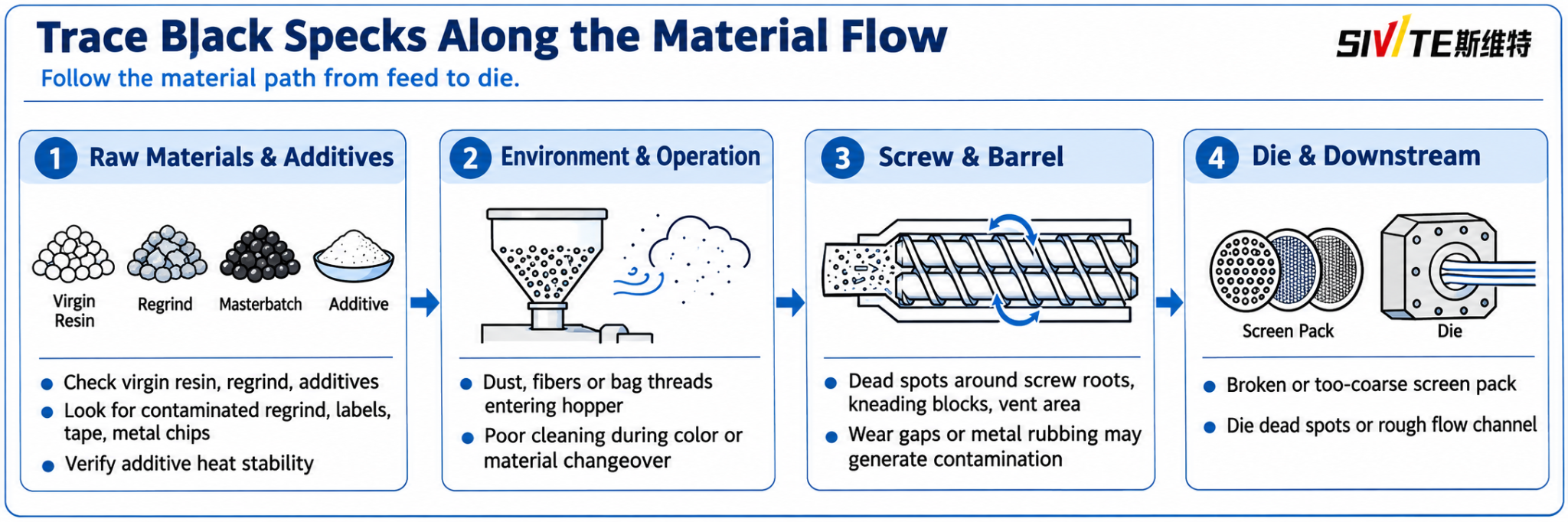
2.1 Raw Materials and Additives
In many cases, contamination enters the process before the material even reaches the feed hopper.
Virgin resin and masterbatch
Check the original resin, color masterbatch, and functional additives. Some raw materials may already contain black particles introduced during polymerization, compounding, or pelletizing.
Regrind and recycled material
Regrind is a particularly important source of contamination.
Repeated recycling and grinding can introduce:
- Label and adhesive residues.
- Packaging film fragments.
- Foreign polymer particles.
- Metal fragments from worn grinding equipment.
Additive degradation
Low-quality or thermally unstable antioxidants, lubricants, processing aids, and other additives may discolor or decompose under processing temperatures.
Recommended checks:
- Inspect the virgin resin, masterbatch, and additives separately.
- Compare samples from different raw material batches.
- Check regrind for foreign materials before feeding.
- Verify the thermal stability and compatibility of additives.
2.2 Production Environment and Operator Handling
Not every contamination problem originates inside the extruder.
The production environment and material handling procedures can introduce foreign particles into the system.
Common problems include:
- Dust accumulating on overhead pipes, ceilings, or equipment.
- Mixing containers left uncovered.
- Fibers from woven bags entering the hopper.
- Glove fibers and other foreign materials falling into the feed system.
- Incomplete cleaning during color or material changeovers.
Recommended checks:
- Keep mixing containers and feed hoppers covered.
- Clean the mixing and feeding areas regularly.
- Inspect material transfer pipes and hopper openings.
- Establish a standardized cleaning procedure for every material changeover.
Preventing contamination before it reaches the extruder is generally much easier than removing it afterward.
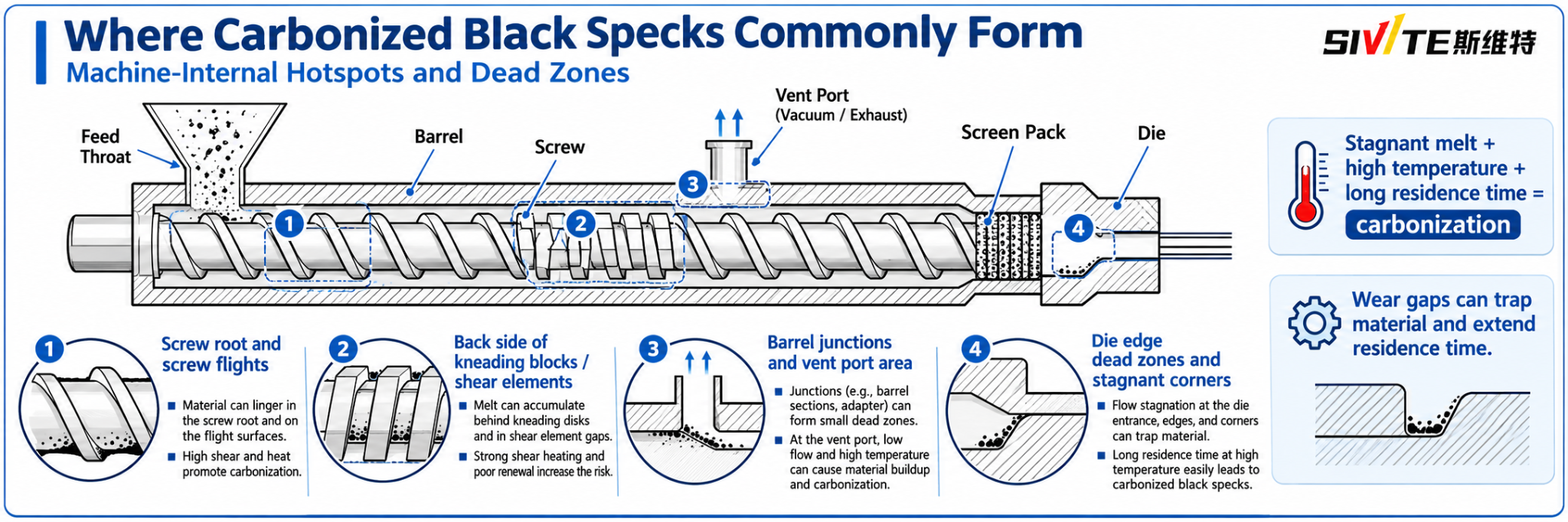
2.3 Screw and Barrel: Internal Carbonization and Wear
This is one of the most important areas to inspect when black specks repeatedly appear during production.
When molten polymer becomes trapped in a high-temperature region and cannot move forward properly, it may gradually degrade and carbonize.
Common accumulation locations include:
Screw roots and flight surfaces
Material can accumulate in worn areas, clearances, or regions with poor melt circulation.
Behind kneading blocks and shear elements
The back sides of kneading blocks and small geometric gaps can become locations where material remains for extended periods.
Barrel connections and vent ports
Material accumulation around barrel joints, adapters, and vent openings can gradually form carbonized deposits.
This is especially important when vent flow, melt backflow, or vent-port overflow has occurred.
Wear and mechanical contact
As screws and barrels wear, the operating clearance may increase, changing material flow and creating additional retention areas.
In severe cases, mechanical contact between the screw and barrel may generate metal debris.
Recommended checks:
- Inspect screw flights, roots, and kneading elements.
- Check the wear condition and operating clearance.
- Examine vent ports and barrel connections for accumulated material.
- Check screw alignment and signs of abnormal metal contact.
- Inspect the die adapter and other downstream components if contamination continues.
2.4 Screen Pack, Die, and Downstream Equipment
If the raw materials and main extruder components appear normal, continue checking the downstream melt-flow system.
Damaged or unsuitable screen packs
A damaged screen or an unsuitable filtration configuration may allow contaminants to pass through.
The screen pack should be selected according to the polymer, contamination level, melt pressure, and production rate.
Dead zones inside the die
Poorly designed flow channels, rough internal surfaces, and stagnant corners can trap molten polymer.
Over time, these deposits may degrade and detach, releasing black particles into the finished product.
Other inspection points include:
- Screen changer.
- Breaker plate.
- Melt pump.
- Die adapter.
- Die lips and internal flow channels.
A thorough inspection should cover the entire melt-flow path, not just the screw and barrel.
3. Practical Solutions: Three Ways to Eliminate Black Specks
After identifying the source, choose a cleaning or prevention method that matches the actual problem.
Solution A: Physical Protection Against External Contamination
If the black specks originate from foreign materials, improving raw material handling and filtration is the priority.
1. Improve housekeeping
Keep mixing and feeding areas clean and covered. Clean the hopper, mixer, and material transfer system during every material changeover.
2. Install magnetic separators
Install strong magnetic bars or magnetic separators at suitable feeding locations to capture ferrous metal particles.
Magnets do not remove nonmagnetic contaminants such as aluminum, copper, or many austenitic stainless steel particles.
3. Optimize the screen pack
Select an appropriate screen mesh configuration.
For example, some applications may benefit from changing from an 80-mesh screen to a 120-mesh screen or using a multi-layer screen pack.
However, finer filtration is not automatically better. Excessive filtration resistance can increase melt pressure, reduce output, and create additional processing problems.
Always consider the resin characteristics, equipment pressure limits, and production requirements.
Solution B: Purging and Cleaning Carbonized Material
If carbonized deposits have accumulated inside the extruder, continuing normal production without cleaning may allow the contamination to persist.
1. Use a compatible purge resin
Depending on the polymer being processed and the equipment manufacturer's recommendations, suitable purge resins may include HDPE or PMMA.
The purge material must be compatible with the previous and subsequent processing materials and operating temperatures.
Do not select a purge resin simply because it has high viscosity.
2. Use professional purging compounds
Commercial purging compounds are designed to remove residual polymer and deposits from screw and barrel surfaces.
Some products use mechanical scrubbing, chemical cleaning, or controlled foaming mechanisms.
Select a compound suitable for the resin and processing temperature, and follow the supplier's recommended operating procedure.
3. Controlled cooling and restart
Certain cleaning procedures use controlled cooling and reheating to help loosen deposits.
However, this is not a universal cleaning method. Thermal cycling should only be performed when approved by the equipment manufacturer and the purging-material supplier.
Uncontrolled cooling, solidified material, or excessive restart pressure can damage the screw, barrel, seals, or drive system. Do not intentionally chill a loaded extruder or restart against a suspected solid plug. Follow the equipment maker’s written temperature, heat-soak, pressure and torque limits; trained personnel must isolate and lock out energy sources and verify zero pressure before opening any melt-path component.
Solution C: Remove the Screw for Thorough Cleaning
If black specks continue to appear after several properly performed purging cycles, more serious carbonized deposits or mechanical wear may be present.
In this situation, screw removal and detailed inspection may be necessary.
Recommended procedures:
- Follow the manufacturer's shutdown, isolation, and lockout procedures.
- Remove the screw using the appropriate extraction equipment.
- Clean deposits using suitable professional carbon removers or soft copper/brass cleaning tools where appropriate.
- Avoid aggressive steel scraping or hard tools that may scratch the screw surface.
- Inspect the barrel, screw flights, kneading blocks, and vent areas for wear or damage.
- Check and clean the die flow channels and adapter.
Scratches and rough surfaces can become new locations for polymer accumulation, creating another source of carbonized particles.
For severely damaged or worn components, cleaning alone may not solve the problem. Repair or replacement may be necessary.

4. Quick Troubleshooting Table
Use the following table as a starting point when black specks appear during production.
| Observed problem | Possible source | First inspection | Corrective action |
|---|---|---|---|
| Brown or black particles appearing repeatedly | Carbonized polymer | Screw roots, kneading blocks, barrel dead zones | Confirm the deposit source; use a compatible purge or clean the affected component. |
| Sharp-edged metal particles | Mechanical wear or external metal contamination | Screw/barrel contact, magnets, grinding equipment | Check and correct wear; use magnetic separation only for magnetic debris. |
| Fibers or film fragments | Raw materials or packaging | Hopper, mixing area, material transfer | Isolate the contaminated batch and clean and cover the feed path. |
| Black specks after color changeover | Residual previous material | Mixer, hopper, screw, barrel and die | Verify a documented changeover and purge the affected path. |
| Black specks after vent overflow | Material accumulation around vent area | Vent port, vent section and downstream flow path | Correct the vent upset and remove deposits using the OEM procedure. |
| Black specks appearing after extended production | Long residence time or thermal degradation | Melt temperature, output, screw speed and stagnant areas | Review actual melt temperature and residence time against the material and machine limits. |
| Black particles despite repeated purging | Persistent carbon deposits or equipment wear | Screw removal and complete inspection | Plan a safe shutdown, isolation and OEM-approved inspection. |
These are diagnostic clues rather than definitive diagnoses. Confirm the source before making major equipment or process changes.
5. How to Prevent Black Specks from Returning
The most effective strategy is to prevent contamination and polymer degradation before they develop into production defects.
We recommend establishing the following routine:
- Raw material inspection: Check incoming resin, masterbatch, additives, and regrind.
- Feeding system maintenance: Keep hoppers, mixers, and transfer pipes clean.
- Controlled material changeovers: Use a documented purging and cleaning procedure.
- Temperature monitoring: Monitor actual melt temperature instead of relying exclusively on barrel temperature settings.
- Residence time management: Avoid unnecessary material retention during low-output operation and extended production stops.
- Equipment inspection: Regularly inspect screw and barrel wear, vent openings, screen packs, and die channels.
- Preventive maintenance: Record recurring black-speck problems and identify the components or operating conditions associated with them.
A consistent maintenance and inspection system is much more effective than repeatedly increasing purge time after defects appear.
Frequently Asked Questions
1. What causes black specks in plastic extrusion?
The most common causes include carbonized polymer caused by excessive heat or long residence time, contaminated raw materials, foreign particles entering through the feeding system, worn screw and barrel components, and deposits inside the die.
2. How can I tell whether black specks are carbonized plastic or external contamination?
Carbonized polymer often has irregular or blurred edges and may show a brown-to-black color gradient. External contaminants may have sharper edges and recognizable structures, such as metal fragments, fibers, or plastic film.
Visual inspection is a useful first step, but microscopy or laboratory analysis may be needed for confirmation.
3. Can a purging compound completely remove black specks?
A suitable purging compound can help remove polymer residues and carbonized deposits from the screw and barrel. However, it cannot repair worn components or eliminate every deposit trapped in inaccessible dead zones.
Persistent contamination may require screw removal and equipment inspection.
4. Can a finer screen pack solve black-speck problems?
A finer screen pack can capture some external particles, depending on their size and the filtration configuration. However, it cannot prevent carbonized polymer generated downstream of the screen or remove deposits formed inside the die.
The filtration system must be matched to the material and operating conditions.
5. When should the extruder screw be removed for cleaning?
Consider screw removal when black specks continue to appear after properly performed purging procedures, when significant carbon deposits are suspected, or when equipment wear and mechanical contact need to be inspected.
Final Thoughts
Black specks in plastic extrusion are not just a cosmetic defect. They often indicate problems with raw material quality, contamination control, polymer thermal stability, or equipment condition.
The most effective approach is simple: identify the particle, trace the material flow, locate the source, and apply the correct cleaning or preventive measure.
Do not immediately blame the raw material, increase filtration, or disassemble the extruder without evidence.
A systematic troubleshooting process can reduce unnecessary downtime, lower scrap rates, and improve the consistency of your extruded plastic products.
Need help troubleshooting black specks in your extrusion process?
Contact the SWT-EXTRUSION technical team with your resin type, processing temperature, screw configuration, production output, and photos of the black-speck defects.
Our team can help you evaluate possible causes and identify practical improvements for your extrusion process.
SWT Extrusion designs and manufactures plastic sheet extrusion lines. Its technical team can review screw and barrel configuration, melt filtration, and operating conditions as part of an application discussion.